Unfollow Check · X (Twitter)
How many accounts don’t follow you back?
Find out with one X archive file. Request it today, and it usually arrives tomorrow.
No server to send your data to
No password asked, nothing stored. That’s why you need the archive file X makes for you. It’s read only inside this browser and is gone when you close the tab.
Never hand your X password to anyone just to check your follows.
Add your archive
-
Request your archive from X
In the X app, open Settings and privacy and tap through the screens below. X will ask for your password and a verification code to confirm it’s you.
-
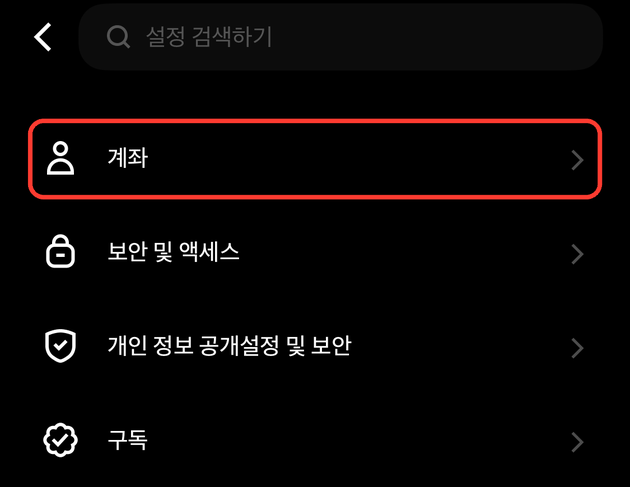
Your account -
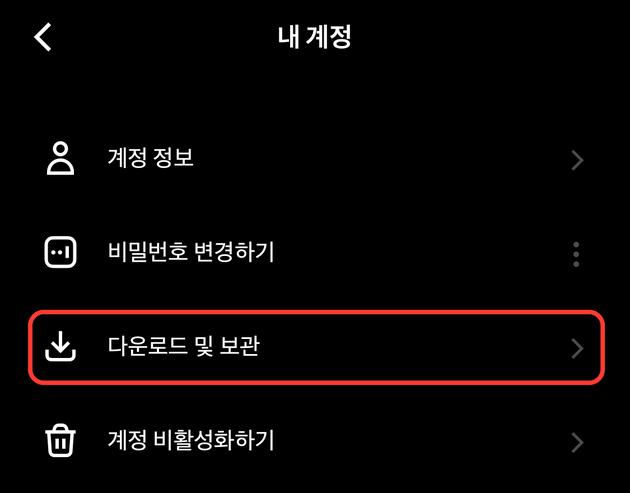
Download an archive -
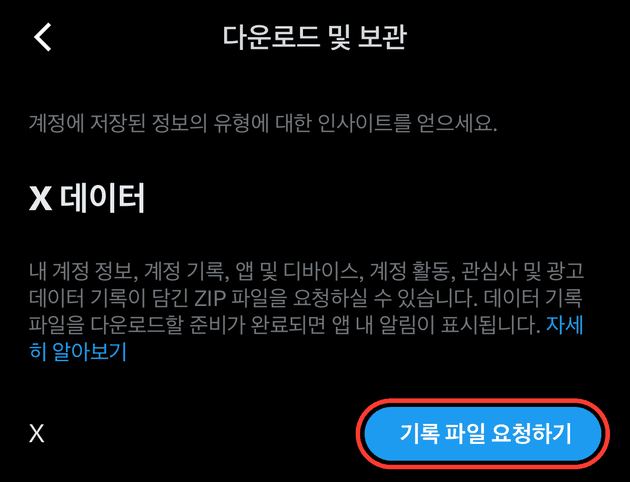
Request archive
Takes you straight to the second screen above. Opens on the web if you don’t have the X app.
-
-
Wait about a day
X will notify you in the app and by email when your file is ready. Tap the notification, download the zip, then come back to this page.
Requested? Now you just wait. Add this to your Home Screen to find it again easily.

Add to Home Screen
Open it like an app with one tap.
- X may ask you to log in and verify again when you download.
- It includes your photos and videos, so it can be large. Wi-Fi is recommended.
- On iPhone the zip is in the Files app under Downloads; on Android, in your Files app’s Download folder.
-
Add the zip
Your file is read only inside this browser